Northbridge Studio
Changing web designers? A website handover checklist for business owners
Changing web designers? Use this website handover checklist to confirm account access, collect files, protect email, and plan the switch before cancelling services.
Changing web designers? A website handover checklist for business owners
Before changing web designers, confirm that your business can access its domain, website, email, and search accounts. Collect a usable copy of the site, agree who will handle the change, and test the important customer journeys before ending the old arrangement.
A website can keep working even when you have no practical control over it. You might be able to edit a page but not renew the domain, restore a backup, or invite another developer. The point of a handover is to find those gaps while the current provider is still available.
First, decide what is actually changing
Changing the person who maintains your site does not, by itself, mean you need new hosting, a new domain, or a rebuild. Those are separate decisions. Ask the incoming provider which services can stay where they are and which genuinely need to move.
For example, a service business might want a new designer to improve its pages while leaving its existing email and hosting in place. That could begin with named account access and a site review. If the old agency hosts the website inside its own account, a move may be necessary instead. Establish that before choosing a cancellation date.
Northbridge's recommendation is to separate the handover from the redesign decision. First establish what exists and who controls it. Then decide whether to keep, improve, or replace the site.
Build an account checklist you can verify
Start with a list of services, not a folder of shared passwords. For each one, record the provider, the business contact responsible for it, the renewal date, and the access you have actually checked. Use account invitations where available, and keep passwords and recovery codes in an appropriate password manager rather than the handover document.
The practical question is whether your business can keep the service running and give the next provider suitable access. A screenshot of an account dashboard is useful context, but it does not establish that you can sign in or recover access.
Access levels matter. Google Analytics distinguishes account-level access from property-level access; an invitation to one property does not provide access to everything in the account. In Search Console, make sure a business-controlled account has verified ownership before the previous provider leaves.
| Service or asset | What to verify |
|---|---|
| Domain registration | Know the registrar, renewal date, registrant details, billing contact, and how your business accesses the account. |
| DNS | Identify where the domain's routing records are managed. Ask for an export and who is authorised to change them. |
| Website and hosting | Confirm the platform, administrator access, hosting account arrangement, current site copy, and how changes are published. |
| Business email | Confirm the email provider, administrator contact, active mailboxes, and any connection to the old hosting package. |
| Analytics and search | Check access to the existing Analytics and Search Console properties. Record the property identifiers and responsible business account. |
| Connected tools | List form delivery, booking, payments, CRM, and paid themes or plugins. Record billing, access, and any replacement licence needed. |
| Creative and source files | Request the agreed code, editable designs, approved copy, and media files. Confirm which files and usage rights the agreement includes. |
Sources: Google Analytics: user access and permissions, Google Search Console: owners and users
Ask for a site copy the next provider can use
A handover is incomplete if the files arrive but nobody knows what they contain. Ask the incoming provider to confirm that the copy is current, what is needed to run it, and how it would be restored or published. The answer depends on the platform.
For a typical WordPress site, a full recovery copy needs both the website files and the database. The standard Tools → Export download is an XML content export; it is not a complete substitute for those two parts. WordPress documents the content export and full-backup requirements separately.
For a custom-coded site, ask for the source repository and the build and deployment instructions. Have the incoming developer identify any environment settings, external services, or credentials needed to run it, and arrange their transfer securely. For a hosted website builder, check its account-transfer and export options before assuming it can move unchanged to another platform.
Also ask which licences belong to the agency. A theme, font, photograph, or plugin may have been supplied under a licence that needs replacing when you leave. Confirm the actual terms rather than assuming that receiving a file transfers every right attached to it.
Sources: WordPress: files and database backups, WordPress: what Tools → Export contains
Keep email out of an unnecessary website move
Your domain name, website hosting, and email can use different providers. Before cancelling an old hosting package, check whether it also contains business mailboxes, DNS management, or other services you still use.
DNS is the set of records that directs requests for your domain. Some records point people to the website; MX records direct incoming email. Nameservers identify where those records are managed. Moving the website and changing the nameservers are therefore different operations.
If DNS needs to move, have the person responsible compare the existing records with the new setup, including email and verification records. Cloudflare's setup guidance explicitly calls for reviewing DNS records and identifies email settings as part of that review. This principle is useful even if Cloudflare is not your provider.
Ask for a clear plan: what changes, who makes the change, what they will test, and how they can return to the previous setup if necessary. Avoid bundling a website move and an email migration together simply because you are changing designers.
Sources: Cloudflare: MX records and email routing, Cloudflare: what nameservers control, Cloudflare: review records before a nameserver change
Agree the handover sequence before ending services
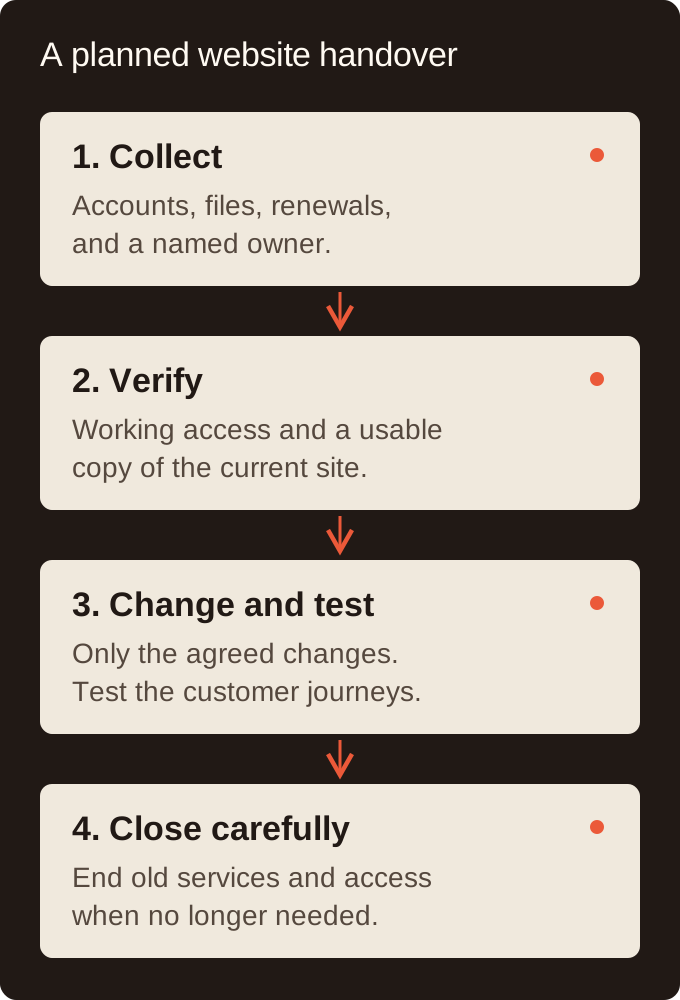
Use a short transition plan with a named person responsible for each step. Agree the notice period, any handover work, and the last supported date with the existing provider. Keep services needed for the transition active until the replacement has been checked.
Before the switch, record how the important journeys work today: submitting an inquiry, receiving its notification, booking an appointment, signing in, or paying, where relevant. After the change, test those journeys again on a phone and a desktop. Opening the homepage is only one check. Use an agreed test method for payments and avoid sending real customer information through a test.
Close the handover by documenting who now handles support, renewals, and incidents. Then review the outgoing provider's access. Remove access no longer needed, with any continuing support access explicitly agreed.
Search Console has an extra detail worth checking: removing a verified owner does not automatically remove the verification tokens they used. Google says remaining tokens can let that person verify ownership again. Have the responsible developer review those methods carefully; a token may also be used by another Google service.
Sources: Google Search Console: removing owners and unused tokens
A handover request you can adapt
Keep the request factual and collaborative. You are asking both teams to establish what is in place, what is changing, and what needs to keep working. Adapt this wording to your agreement and send it through your normal project channel.
Suggested wording
We are arranging a change in who supports our website. Could you help us document the domain registrar, DNS provider, hosting, email, website administrator access, and connected tools? Please identify which accounts we control and which sit within your agency accounts.
Please also confirm the current site files or export available for our platform, any deployment or recovery instructions, and any licences or subscriptions we would need to replace. We would like to agree the handover tasks, any fees, notice period, and final support date before cancelling services.
Our incoming provider will check access and the site copy with us. Please use account invitations or an agreed secure method for access; we do not need passwords included in this document.
How to know you are ready to switch
Before confirming the final date, ask three questions: Can our business access the essential accounts? Can the incoming provider work with the site and recover it if needed? Does everyone know what must stay active until the checks pass? A missing answer is a handover task to resolve before the switch.
If your main question is whether the site needs replacing, our redesign versus rebuild guide covers that separate decision. If you are comparing ongoing support costs, start with the website maintenance cost guide.
For an inherited website, Northbridge can review the current setup and scope practical support. Send us the website address and what you want to change; keep passwords and recovery codes out of the inquiry. Establishing what you already have is a useful first step before agreeing to a larger project.
Meet the studio behind the guide
Work directly with Kyle on the design and build. Explore Northbridge’s studio profile and Kyle’s professional profiles.
Related website example and Northbridge feedback
Bryn Stevenson: “They don’t just build websites, they build something they’re proud to put their name on.”
Have a question about your website?
Have a question about something you read, or need help with your own website? Tell us what you have in mind.
Related next steps
Explore the services that support this website decision.
Based in Midtown Toronto near Yonge and Eglinton, serving businesses across Toronto, North York, the GTA, and nearby Ontario communities with hands-on web design and development.
https://northbridge.studio/insights/website-handover-checklist